




Wizardo Casino Payments
Payments at Wizardo are managed directly from your player account. You can add funds using cards, bank services, digital payment options and cryptocurrencies, while withdrawals are handled separately through the options available in your Wallet.
Before making a Wizardo Casino deposit or submitting a Wizardo Casino withdrawal, check the options currently available for your account. Availability can depend on the transaction type, country and payment provider.
Payment Options Available at Wizardo Casino
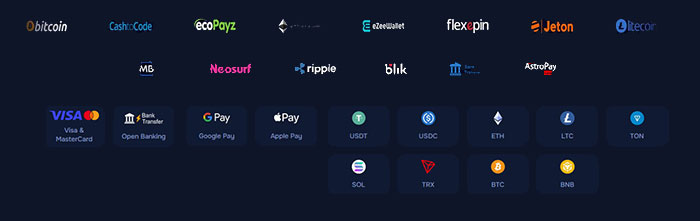 At Wizardo casino we support several payment methods, including cards, bank transfers, digital services and cryptocurrencies. Deposit and withdrawal options are managed separately, so the available list can differ depending on the type of transaction.
Cards and Bank Payments
Visa and MasterCard are available among the card options. Bank-related services can include Open Banking, Bank Transfer, Sparkasse, Deutsche Bank, Commerzbank and Volksbanken Raiffeisenbanken. SEPA is also available for withdrawals.
Online banking provides an alternative when you prefer to complete a transaction through a supported banking provider rather than using a card or cryptocurrency.
E-Wallets and Alternative Payments
Deposit options can also include CashtoCode, ecoPayz, eZeeWallet, Flexepin, Jeton, Neosurf, AstroPay Card, BLIK and MB. Google Pay and Apple Pay are available among the digital payment choices.
The exact selection can vary, so use the options currently displayed in your Wallet when choosing how to fund your balance.
Cryptocurrency Payments
Crypto deposits are available with USDT, USDC, BTC, ETH, LTC, SOL, TRX, BNB and TON. Some assets are supported on several blockchain networks, so the correct network must be selected together with the cryptocurrency.
For example, USDT can be available through TRC20, ERC20, BEP20, TON, Optimism, Solana, Polygon, Avalanche and Arbitrum. USDC and ETH can also be offered through more than one network. Always use the asset and network selected for the transaction.
How to Make a Wizardo Casino Deposit
Deposit from Your Account
Open your player account, go to the Wallet and select Deposit. Choose the option you want to use, provide the required details and enter the amount you want to add. Check the transaction information before confirming the payment.
Once the funds are credited to your real-money balance, they can be used for eligible casino games.
Deposit with a Card, Bank or Digital Payment Option
For card, bank and digital payments, select the relevant provider and follow the payment flow in your account. Some services may require additional confirmation through your bank or payment provider.
Processing time can vary depending on the selected provider and any checks required for the transaction. The availability of a particular service does not mean that all payments are instant deposits.
Deposit with Cryptocurrency
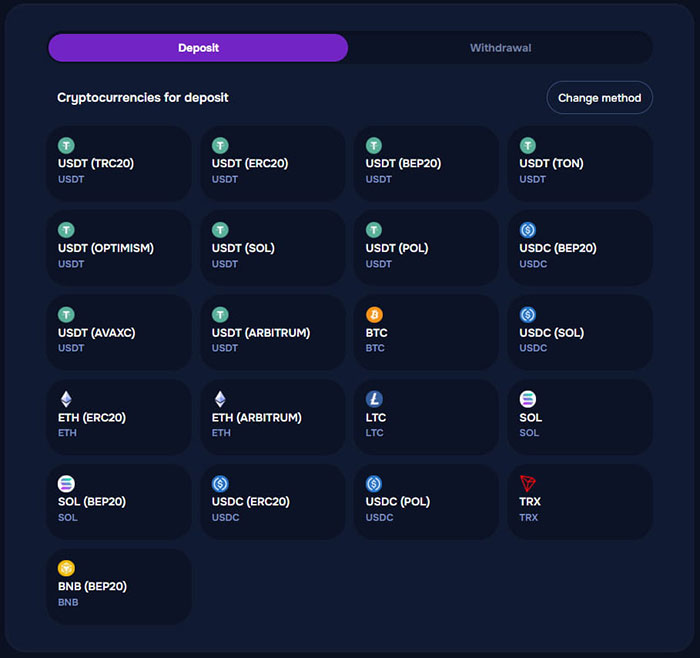 For a crypto payment, select both the asset and the required blockchain network before transferring funds. This is especially important when the same cryptocurrency is supported on several networks.
Use the payment details provided for the selected option and make sure the chosen network matches before sending the transfer.
Deposit Limits and Availability
Minimum deposit amounts and available services can vary depending on the selected option. The applicable minimum, supported currencies and currently available services are shown in the Deposit area. Wizardo's Terms also state that available deposit options and accepted currencies may depend on the selected service.
Deposit Rules Before You Start Playing
Use Your Own Payment Method
Deposits must be made using a payment source that belongs to the registered account holder. Payments from friends, relatives, partners or other third parties are not permitted. If a third-party deposit is detected, the funds can be returned to the original payer and related winnings may be forfeited.
Real-Money Deposit Turnover
A real-money deposit is normally subject to turnover before a withdrawal can be made. Under the current Terms, the deposited amount must generally be wagered at least three times. Wizardo may reduce this requirement in an individual case, but not below one time the deposit amount.
This condition is separate from promotional wagering requirements. If you activate a promotion, its own rules can apply in addition to the standard turnover requirement for deposited funds.
Verification During Deposits
Wizardo can request KYC verification in connection with a deposit. Make sure the personal information on your account is accurate and that the selected payment source belongs to you.
Using a Bonus with Your Deposit
Some promotions are linked to qualifying deposits. When an eligible offer is available, activate it according to its conditions and complete the required transaction from the Wallet.
How a Deposit Promotion Works
A deposit bonus can add promotional funds, Free Spins or both after a qualifying payment. The minimum deposit, validity period, wagering conditions, maximum bet and cashout limits are defined separately for each promotion.
First Deposit Example: 1st Lucky Spell
The 1st Lucky Spell provides 100% extra funds and 100 Free Spins on a qualifying first deposit from €20. The offer has a 35x wagering condition on the bonus amount, a 168-hour wagering period and a maximum bet of €5 while wagering the promotion.
The promotional funds are credited to the bonus balance, while the Free Spins are added separately according to the offer conditions.
Bonus Funds and Withdrawals
Bonus funds are not available for ordinary withdrawal while the applicable promotion conditions remain incomplete. Before submitting a payout request, check both the standard deposit turnover and any active bonus conditions.
How to Withdraw from Wizardo Casino
Submit a Withdrawal Request
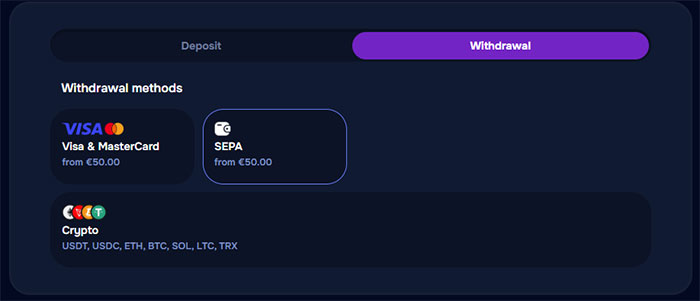 Open the Wallet and select Withdrawal. Choose one of the available payout options, provide the required details, select the amount and submit the request. You can only withdraw money that is available in your balance and eligible for withdrawal.
Available Withdrawal Options
| Option | Current details |
|---|---|
| Visa & MasterCard | Available for withdrawals with a current minimum of €50. |
| SEPA | Available for bank withdrawals with a current minimum of €50. |
| Crypto | USDT, USDC, ETH, BTC, SOL, LTC and TRX are available as payout options. |
Why Deposit and Withdrawal Options Can Differ
Deposit and withdrawal options are managed separately, so a service used to add funds may not always be available later as a withdrawal method.
Under the Terms, a withdrawal can be sent to the bank account or other option used for the deposit, or to another available option at Wizardo's discretion.
What Must Be Completed Before a Withdrawal
Deposit Turnover
Before submitting a withdrawal request, make sure the applicable real-money turnover has been completed. A request will not be processed until the required conditions have been met.
Active Bonus Conditions
If promotional funds are active on the account, the corresponding bonus conditions must also be completed. Funds marked as bonus money cannot be withdrawn as ordinary cash before the applicable rules are satisfied.
Balance and Withdrawal Minimum
You cannot request more than the available account balance. Minimum and maximum withdrawal limits can depend on the selected option, VIP level and account status. The applicable limits are shown in the Withdrawal area.
Account Verification for Payments
Document Verification
Identity verification can be required before a withdrawal is processed. Documents used for verification can include a passport, identity card or driving licence.
Additional KYC Checks
Depending on the transaction, Wizardo can also request proof of address, confirmation of payment ownership, bank or card information, or an additional identity check such as a selfie or video verification.
Why Payment Ownership Matters
Payment verification confirms that the card, bank account, wallet or other payment source belongs to the registered player. This also supports the rule that third-party payments are not accepted.
What Happens After a Withdrawal Request
Withdrawal Processing
Processing time depends on the selected payout option and the verification status of the account. There is no single average payout time for all withdrawals because different services and account checks can require different processing periods.
Cancelled Withdrawals
If a withdrawal is cancelled, the requested funds are returned to the account balance and become available again according to the applicable account conditions.
When a Withdrawal Cannot Be Processed
If a request cannot proceed, check your verification status, deposit turnover, active bonus conditions, requested amount and available balance. The specific reason for an individual transaction will be shown in the account where available or can be confirmed through support.
Payment Problems and What to Check
A Deposit Option Is Missing
Available services can vary by country and provider. If an option is not currently available, choose one of the alternatives offered in the Deposit area.
A Crypto Deposit Shows Several Networks
Check both the asset and blockchain network before sending funds. For example, selecting USDT does not by itself determine whether the transaction should use TRC20, ERC20, BEP20 or another supported network.
A Deposit Option Is Not Available for Withdrawal
Deposit and withdrawal options are managed separately, so not every service available for deposits will also be offered for payouts. Use one of the options currently available in the Withdrawal area.
Your Withdrawal Is Waiting for Verification
Open the verification section in your account and check whether additional documents or information are required. Complete the requested verification before submitting another payout request.
FAQ
How do I make a Wizardo Casino deposit?
Open the Wallet, select Deposit, choose one of the available options and provide the required payment details. Confirm the amount and complete the transaction.
Can I deposit with Visa or MasterCard?
Yes. Visa and MasterCard are available among the card options for deposits.
Can I use Google Pay or Apple Pay?
Yes. Google Pay and Apple Pay are available among the digital payment options for deposits.
Which cryptocurrencies can I deposit?
The available crypto selection includes USDT, USDC, BTC, ETH, LTC, SOL, TRX, BNB and TON. Several assets can be used through more than one blockchain network.
What is the minimum deposit?
The minimum depends on the selected payment option and is shown in the Deposit area. Individual promotions can also have their own qualifying minimum.
Can I use someone else's card or wallet?
No. Deposits from third parties are prohibited, and the payment source must belong to the registered account holder.
Do I need to wager my deposit before withdrawing?
Yes. Under the current Terms, a deposit normally has to be wagered three times before withdrawal. Wizardo may reduce the requirement in an individual case, but not below one time the deposited amount.
Can I use a bonus when depositing?
Yes, when an eligible promotion is available. Check the qualifying amount and individual offer conditions before completing the deposit.
How do I withdraw from Wizardo Casino?
Open the Wallet, select Withdrawal, choose an available payout option, provide the required information and submit the amount you want to receive.
What is the minimum withdrawal?
The current minimum for Visa, MasterCard and SEPA is €50. Other options can have different limits, so check the value shown for the selected payout option.
Do I need verification before withdrawing?
Verification can be required before a withdrawal is processed. Depending on the account, Wizardo can request identity, address and payment ownership documents.
What happens if I cancel a withdrawal?
The funds are returned to your account balance. They can then be used again subject to the conditions applying to the account.